

How AI Improves Workplace Communication
AI speeds drafting, meeting notes, and knowledge search but still needs human review, training, and data hygiene to avoid errors.


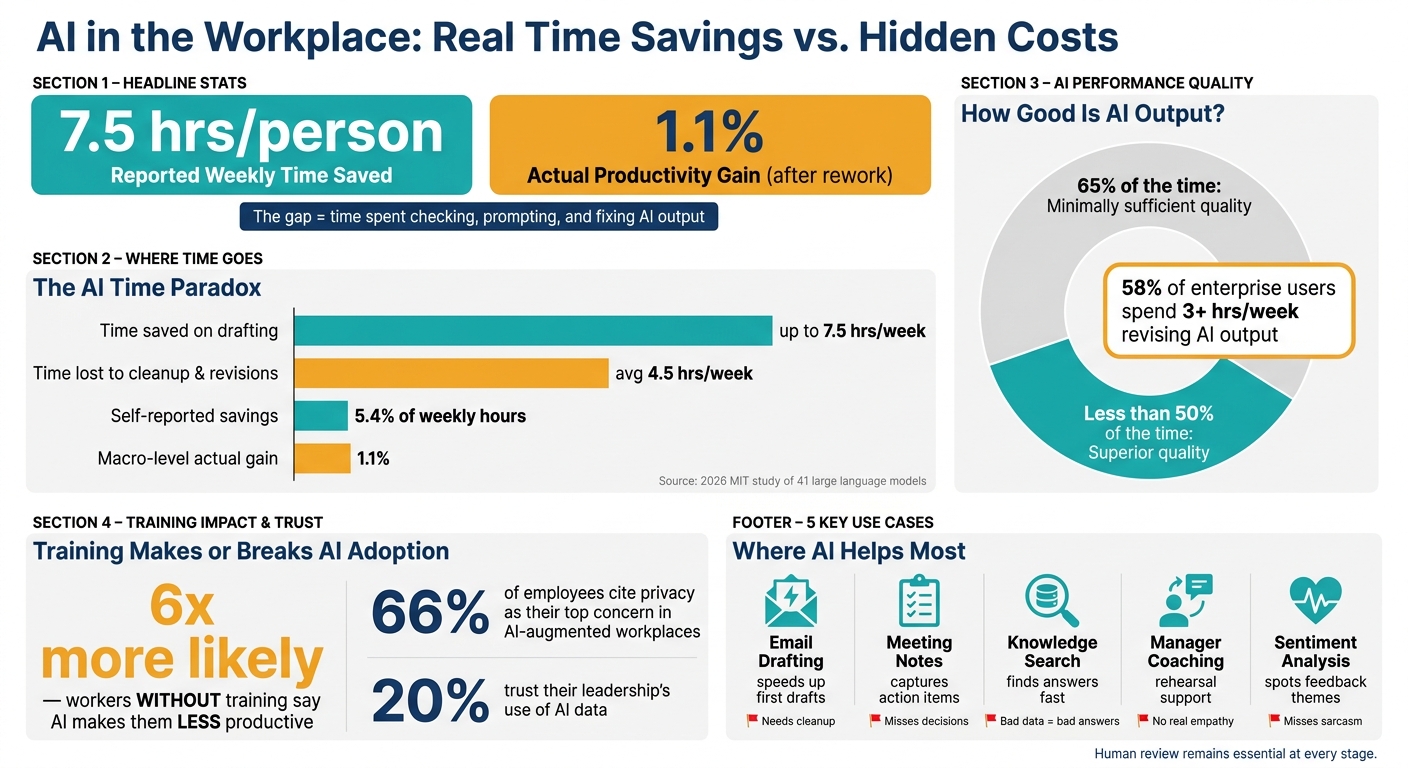
AI helps people write emails, summarize meetings, search company knowledge, and move tasks across teams - but it does not remove the need for human review. Based on the research in this article, workers may save 7.5 hours per week at first, yet much of that time can be lost to checking, prompting, and fixing output. At the company level, the gain looks much smaller: about 1.1% after rework is added back in.
If I had to boil the article down to a few points, it would be this:
- AI is best at first drafts and routine follow-up work
- Meeting tools help with notes and action items, but can miss final decisions
- Knowledge assistants can cut time spent hunting through chat, docs, and email
- Sentiment tools can spot patterns in employee feedback, but they miss context
- The biggest risks are bad summaries, bad data, privacy issues, and over-trusting polished output
- Training matters a lot: workers without training are 6x more likely to say AI makes them less productive
This article also makes one thing plain: faster communication does not always mean less work. In some teams, it just means more messages, more review, and more pressure to respond.
Quick comparison
| Area | What AI helps with | Main problem |
|---|---|---|
| Writing tools | Email drafts, rewrites, thread summaries | Cleanup can eat up time |
| Meeting tools | Transcripts, notes, action items | Can confuse ideas with decisions |
| Knowledge tools | Answers from chat, docs, and wikis | Bad or old data leads to bad answers |
| Manager support | Practice for feedback talks | People still need to handle the actual conversation |
| Listening tools | Spot themes in employee comments | Can miss tone, sarcasm, and office context |
If you want the short answer: AI can improve workplace communication most when teams use it as a helper, not as the final word.
AI in the Workplace: Real Time Savings vs. Hidden Costs
How to Use AI for Internal Communication (Use Cases & Tools) | ClickUp
sbb-itb-3d8e4fc
What Studies Show About AI Writing and Meeting Tools
The evidence on AI writing tools is mixed. Study after study points to one clear pattern: AI helps people move faster on routine work like drafting emails, trimming long threads, and building first-pass documents. The clearest gains show up in two areas: drafting and meeting capture.
AI for Email Drafting, Rewriting, and Summarization
The strongest case shows up in routine email and document work. Copilot in Outlook can summarize a 15-email thread in 90 seconds and turn it into bulleted action items with citations linked back to the original messages [9]. If you deal with a packed inbox all day, that kind of shortcut can save a lot of time.
But the slowdown often starts after the first draft. 58% of enterprise AI users spend 3 or more hours per week revising or redoing AI outputs, and the average worker spends about 4.5 hours per week cleaning up low-quality AI output [3]. A 2026 MIT study of 41 large language models found that AI produced "minimally sufficient" output 65% of the time, but achieved "superior quality" less than 50% of the time [1].
So yes, AI can speed up drafting. But if the output needs heavy cleanup, part of that gain disappears. That tradeoff hits hardest in high-stakes writing, where an error that sounds polished can slip by and take time - and money - to fix.
| Factor | Documented Benefits | Documented Drawbacks |
|---|---|---|
| Time Savings | Can save up to 7.5 hours per week on initial drafting [1]. | Average of 4.5 hours per week spent on cleanup and revisions [3]. |
| Over-reliance | Empowers junior staff to contribute to complex tasks. | Untrained workers are 6x more likely to report that AI makes them less productive [3]. |
AI for Meeting Notes, Transcripts, and Action Items
The same tradeoff shows up in meetings. AI can record discussion far faster than most people can review it. Meeting tools can turn recordings into structured notes, summarize the main points, list action items, and tag specific people for follow-up [1][2]. For distributed teams, that matters. It means fewer details get lost because nobody wrote them down.
Still, saving the conversation isn't the same as recording the outcome. AI is less steady when it has to tell the difference between ideas people tossed around, issues they debated, and the final decision they made. You can end up with detailed notes that still miss the one thing the team needed most: the decision [3]. And when project records are messy to begin with, the summaries usually come out messy too [4].
Privacy is another big issue. When every meeting is recorded and transcribed, sensitive conversations turn into searchable text. At that point, review rules and access controls aren't just IT concerns. They're part of how teams communicate day to day.
How AI Moves Information Across Teams
AI doesn't just help people write faster. It also helps information move cleanly from one team to another. A lot of employees waste time digging through chat threads, docs, and work apps. AI cuts down that handoff work, which makes it useful for routing information, not just storing it.
The biggest gains show up when someone can ask a question once and get an answer right away, without setting up yet another meeting.
Internal Chatbots and Knowledge Assistants
The clearest wins come from AI systems that connect chat, docs, and work tools so employees can find answers where they already work. Instead of hunting through files or waiting for someone to respond, they can retrieve information in real time [10].
Amazon Web Services reported fast internal adoption of a conversational workspace that searches emails, calendars, chat, and documents. Within ten weeks, 10,000 internal employees were using it [6].
| Application | Primary Purpose | Studied Benefits | Key Risks |
|---|---|---|---|
| Routine Employee Questions | Answer policy, benefits, and FAQ queries | Instant answers; reduced HR/IT ticket volume; 24/7 availability | Giving outdated or false answers; privacy concerns with sensitive data |
| Knowledge Search | Retrieve internal info across apps | Reduced searching old threads; faster onboarding | Surfacing restricted or confidential documents |
| Workflow Support | Route requests and track handoffs | Reduced friction; automatic blocker detection | Too much automation can miss context |
One pattern stands out: data hygiene matters more than the tool itself. If the input is messy, the answer will be too. And when the source material is out of date, trust drops fast [4].
Once AI helps teams find information, it can also help managers put that information to use in tougher conversations.
AI Coaching for Managers and Difficult Conversations
Beyond information retrieval, AI is starting to help managers rehearse performance reviews and conflict resolution before those talks happen in real life [5]. That matters because managers spend 70–90% of their time on communication-related tasks [2]. Weekly feedback can also sharply improve engagement, so helping managers deliver it more often can make a big difference [5].
Still, AI should support difficult conversations, not make them. It can help managers rehearse, sort information, and shape feedback. But empathy, judgment, and ethics still need to stay with people [2][7][8].
Employee Voice, Sentiment, and Communication Quality
AI can do more than speed up internal messages. It can also help teams understand how employees are feeling based on what they say, write, and repeat over time.
AI listening tools take scattered comments and turn them into themes leaders can use.
What Sentiment Analysis Can Detect
Tools that analyze language can sort open-text feedback into themes like workload, recognition, or career growth. They can also track sentiment and spot signs of burnout risk or drops in morale before those issues show up in turnover data.
That matters for a simple reason: miscommunication is expensive. U.S. businesses lost an estimated $1.2 trillion in a single year because of it [14]. If leaders can catch problems earlier - like a team that feels ignored or a project stuck in a bottleneck - they still have time to step in.
One 2025 SaaS company did exactly that. It used monthly pulse checks to spot issues tied to recognition and workload, then launched peer shoutouts and saw engagement improve [11].
Still, AI has limits. It can spot language patterns, but it often misses sarcasm, office politics, and the kind of tension people never say out loud [13]. In remote and hybrid workplaces, it also can't pick up non-verbal signals like pauses, sighs, or facial expressions, even though those cues often carry a lot of meaning [15].
Where Listening Tools Help and Where They Fall Short
The biggest issue is trust. People need clear rules about how feedback data is collected and how it's used. Privacy is the top concern for 66% of employees in AI-augmented workplaces, and only 20% say they trust their leadership right now [13][17]. To help protect that trust, sentiment data should be stored as anonymous findings by theme instead of being tied to individual employees [18].
The strongest setup pairs AI-generated themes with small-group discussions. That gives employees a chance to explain what the data means in plain context, instead of leaving leaders to guess from a dashboard alone [15].
The hard part isn't finding patterns. It's using them without giving the system more credit than it deserves.
Limits, Safeguards, and What the Research Actually Shows
Main Risks Organizations Need to Manage
The gains are real, but these tools also bring new communication risks when teams trust them too fast.
One of the biggest day-to-day risks is that AI can fail quietly. The output may look polished, yet still miss context, precision, or nuance. Researchers found this kind of polished-but-thin output most often in data analysis (55%) and long-form reporting (52%) [3]. At work, that can lead to missed nuance in emails, skewed meeting notes, and weaker handoffs between teams.
AI can also mute disagreement when people treat its output as more objective than it is. That gets risky fast in legal, financial, or medical settings, where a summary can sound confident and still be wrong.
The clearest studies keep landing on the same point: AI works best when people do the final review. The table below links common AI communication uses with their main risks and the guardrails research backs most often:
| AI Application | Primary Risks | Recommended Guardrails |
|---|---|---|
| Email & Chat Drafting | Reduced authenticity; "robotic" tone; missed nuance [3] | Human review; brand voice guidelines [1] |
| Meeting Summarization | Hallucinated decisions; loss of nuance in summaries [16] | Treat summaries as helpers, not ground truth; link to original transcripts [16] |
| Knowledge Retrieval | Outdated data; fragmented knowledge in scattered AI-summarized threads [1][16] | One approved knowledge base; keep decision logs and other durable records [16] |
| Manager Coaching | Lack of genuine empathy; resistance to AI suggestions [12][8] | Use AI for rehearsal only; keep human-to-human delivery for actual conversations [12] |
Conclusion: What the Current Evidence Supports
Taken together, the research points to a pretty narrow role for AI: a communication aid, not a decision-maker.
There’s another piece worth keeping in view. The studies have limits too. Much of the research leans on self-reported productivity data and short study windows, often eight months or less [1]. So while the early numbers can look strong, they don’t fully show slower effects like work getting more intense over time or knowledge getting stuck in scattered AI-written chat threads.
The gap between personal reports and bigger-picture data is a good example. Individual workers say they save an average of 5.4% of their weekly hours with AI. But macro-level data puts the actual productivity gain at just 1.1% after review time and rework are added back in [1]. In plain English: some of the time savings vanish once people check, fix, and redo the output.
The organizations getting the clearest gains tend to do a few simple things well. They treat AI output as a first draft that still needs human sign-off, they train employees to judge outputs instead of just generating them, and they set clear rules for when human review is required [1][3][16][19]. That matters a lot because workers without training are 6 times more likely to say AI makes them less productive than workers who get employer-provided training [3].
FAQs
When does AI save time at work?
AI saves time when it takes care of repetitive work like drafting project briefs, summarizing meetings, and handling routine communication. It also makes it easier to get started by getting rid of the blank page. That matters more than people admit. Sometimes the hardest part of a task is simply opening the document and writing the first line.
In team workflows, AI can reduce the need for recurring status meetings by making async updates clearer and easier to share. But efficiency doesn’t happen on its own. If the team isn’t aligned, the time saved can disappear into extra review, higher output demands, and rounds of fixing AI-written drafts.
What communication tasks still need human review?
Human review is still a must for any AI-written communication. AI can turn out polished copy that looks right but still slips in errors, misses nuance, or flat-out invents facts. That means people still need to verify the details, fact-check the claims, and edit the final piece.
This matters even more for high-stakes content. Technical and financial documents need human oversight not just for accuracy, but also for compliance, tone, emotional judgment, and fit with the broader business goal.
How can teams use AI without creating more errors?
Teams can cut down on errors by keeping data clean, setting clear rules for tools, and keeping human oversight in place. AI is only as accurate as the information it pulls from. If the input is messy, the output will be too.
That’s why teams should keep task statuses up to date, log blockers in plain language, and use tags the same way every time. Small habits like these make a big difference.
It also helps to set firm norms for where communication happens. If one update lives in Slack, another in email, and a third in a project board, AI can miss context or stitch together the wrong picture. Keep things in the right place so summaries have a clean trail to follow.
And one more thing: treat AI summaries as support, not final truth. That matters even more for high-stakes decisions, where a missed detail can cause trouble fast. Regular workflow reviews, plus openness about how AI is being used, make it easier to spot mistakes early.


