

Top 7 Apps for Career Skill Growth in 2026
Compare seven apps for leadership, coding, language, and audio learning—choose the one you'll use daily to grow career skills.


If I had to sum it up in one line: pick one app that fits your goal, your time, and how you like to learn.
In 2026, skill-building works best when it is short, frequent, and easy to keep doing. This guide covers 7 apps for leadership, communication, coding, language learning, and audio-based learning, with most paid plans landing around $5 to $20 per month. It also points to one clear pattern: microlearning can top 95% completion rates, while long course formats often fall below 5%.
Here’s the full list covered in the article:
- LinkedIn Learning for leadership, business skills, and AI fluency
- Coursera for job-focused certificates
- Udemy for narrow, skill-specific courses
- Skillshare for project-led design and writing classes
- Codecademy for hands-on coding practice
- Duolingo for daily language learning
- Audible for learning during commutes, walks, and workouts
What I’d look at first:
- Need a credential? Start with Coursera
- Need coding practice? Start with Codecademy
- Need leadership or management skills? Start with LinkedIn Learning
- Need better communication? Use Udemy
- Need portfolio work? Try Skillshare
- Need language fluency? Use Duolingo
- Need a low-effort learning habit? Use Audible
The Best Online Tools for Learning New Skills
sbb-itb-3d8e4fc
Quick Comparison
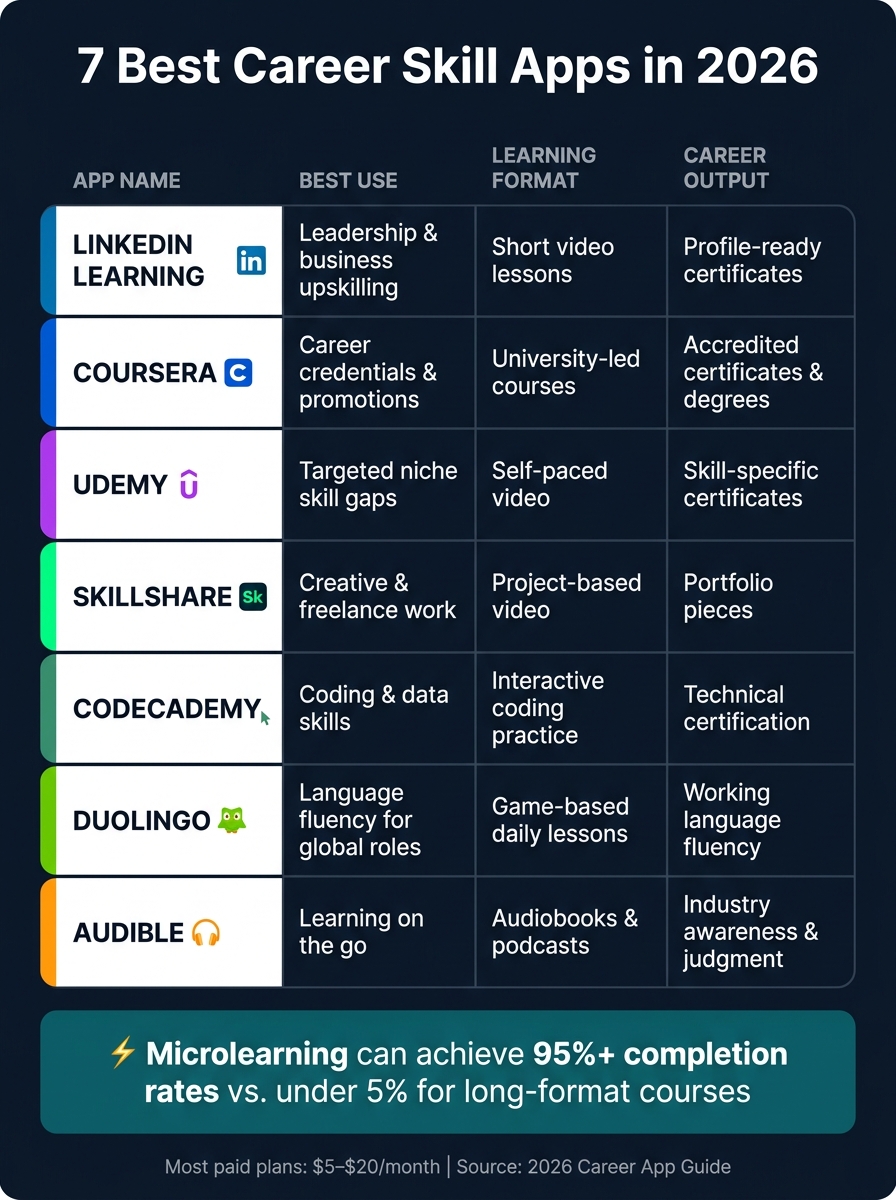
7 Best Career Skill Apps in 2026: Side-by-Side Comparison
| App | Best Use | Main Format | Career Output |
|---|---|---|---|
| LinkedIn Learning | Leadership and business upskilling | Short video lessons | Profile-ready certificates |
| Coursera | Career certificates | Multi-week courses and projects | University and industry credentials |
| Udemy | Targeted skill gaps | Self-paced video | Skill proof through projects and course completion |
| Skillshare | Design, writing, and visual work | Short project-based classes | Portfolio pieces |
| Codecademy | Coding and data skills | Interactive practice | Resume-ready tech skill proof |
| Duolingo | Language fluency | Game-style daily lessons | Working language skills |
| Audible | Learning on the go | Audio lessons, audiobooks, podcasts | Better day-to-day industry knowledge |
My take: the best app is not the one with the biggest course library. It’s the one you will use every day for the next two weeks. That is what this article helps you figure out.
What to Look for in a Career Growth App
Before you pick an app, judge it on four things: role fit, habit support, proof of progress, and mobile convenience.
Start with career-specific learning paths. This is the first thing worth checking. A generic course library can feel like too much all at once. The best apps give you a clear path based on your career stage and niche, whether that’s leadership, coding, or design. Fit matters. But sticking with the app matters even more.
The strongest apps make it easy to come back every day. Short lessons, reminders, and one-tap entry remove friction. It helps to think less about lesson length and more about habit design and daily return. Why? Because steady practice is what moves the needle on career skills.
Look for proof of progress. Visual progress tracking, streak counters, and detailed analytics can help you see how far you’ve come. In technical or creative roles, portfolio-based projects are especially useful. They give you something concrete to show in interviews, performance reviews, or day-to-day career conversations. The app should also fit the time you already have, not demand hours you don’t.
Choose a format that fits your routine. Audio-first lessons can work well during commutes, lunch breaks, and those small gaps between meetings. That way, time you already have turns into focused skill-building.
Use these filters to compare the seven apps below.
1. LinkedIn Learning
Best for
LinkedIn Learning works well for professionals who want steady, career-focused upskilling in leadership, communication, and AI fluency. It stands out for habit support and visible progress, which matter a lot when you're trying to build job skills over time.
Core Skill Area
The main learning tracks cover leadership that blends people skills with AI fluency, data literacy, AI prompting, low-code automation, and communication.
Learning Format
LinkedIn Learning relies on short video lessons built for 20–40 minute sessions. That makes it easier to fit learning into a lunch break, commute, or gap between meetings.
Credential or Career Payoff
Course certificates can strengthen your LinkedIn profile, resume, and promotion discussions. Personalized learning paths can lead to 20–28% faster skill gains than in-person workshops [1].
If you want deeper university-style coursework and formal credentials, Coursera is the next option.
2. Coursera
Best for
If LinkedIn Learning is built for steady upskilling, Coursera is built for credentials that matter when you're applying for jobs or aiming for a promotion. It makes sense for professionals who need recognized proof of skill for a career shift, a step up at work, or a field that leans hard on certifications, like data analytics, AI, or project management.
Core Skill Area
Coursera focuses on high-demand skills, especially AI application, data analysis, digital marketing, and coding. And the course lineup helps here. Programs from Google, IBM, and top universities give the platform extra weight.
Learning Format
Most Coursera courses take a few weeks to finish, though some can be done in just a few days. The platform leans into project-based learning, which means you don't just watch videos and move on. You finish with work samples that can help in interviews or performance reviews.
Credential or Career Payoff
Coursera offers university certificates, industry certifications, and micro-credentials [5]. That's the main draw: it works best when you need clear proof of skill for job applications or promotions.
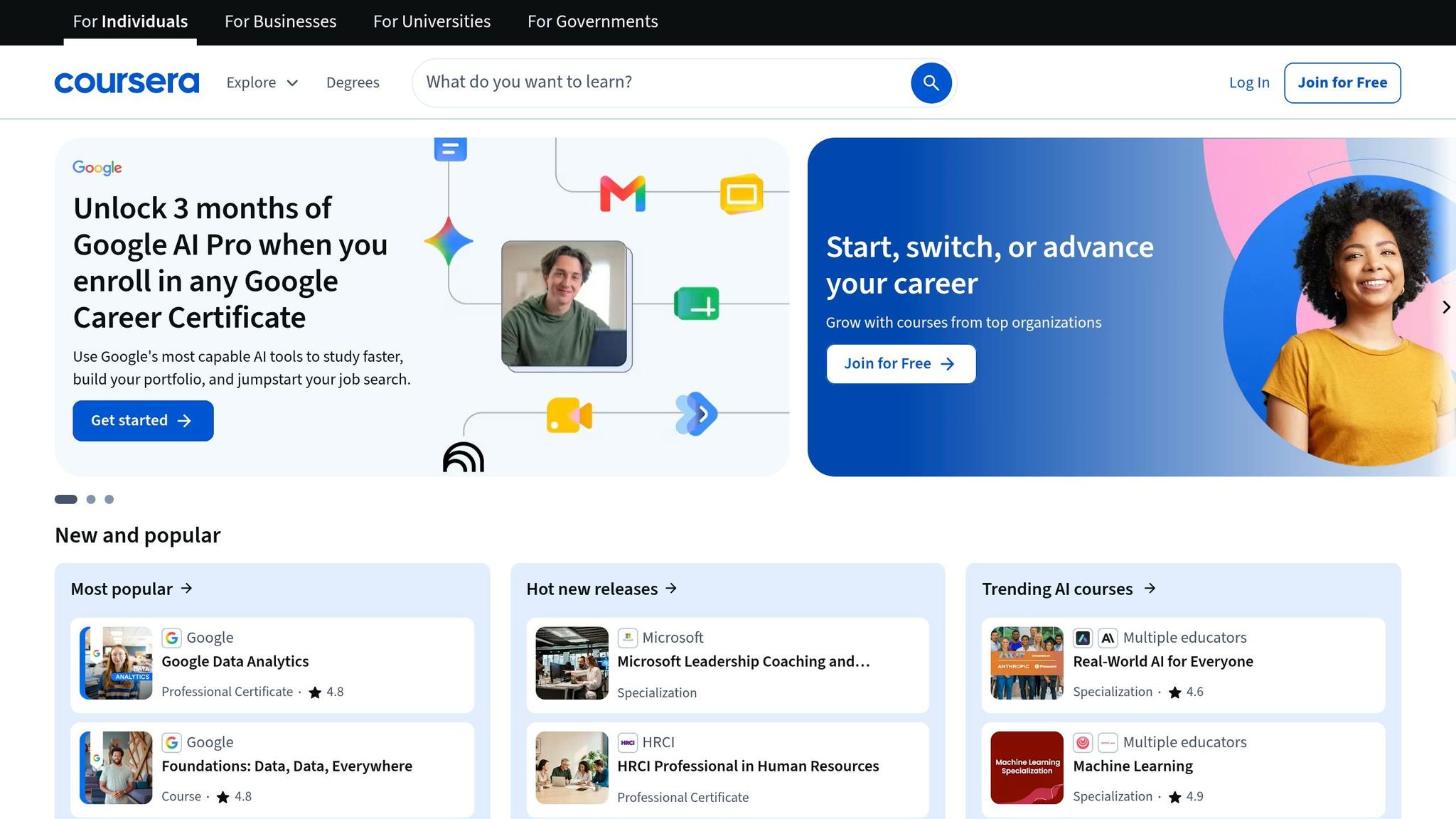
One of the best-known options is the Google Data Analytics Professional Certificate. And in career change cases, continuing education has been linked to salary increases of about 18% [5].
Before you enroll, take a simple step that can save time and money: scan 15 to 20 job postings for your target role and see which certifications show up most often [5].
If you want something with less commitment and more flexibility, the next app is Udemy.
3. Udemy
If you want a lower-commitment way to build a skill, Udemy is a solid pick. It’s built for fast, focused learning, which makes sense when you don’t want to lock yourself into a long program.
Best for
Udemy works best for professionals who want targeted upskilling without a long commitment. It’s especially useful for freelancers and independent workers who need to stay current and learn specific skills fast.
Core Skill Area
The open course catalog is a good fit for niche technical and practical skills. It covers software, design, business, and IT, so it works well when you need to close one clear skill gap without a lot of extra coursework.
Learning Format
Udemy offers low-cost, on-demand courses that let you test a topic before committing to a longer program. That’s helpful if you want to try a new skill without a big upfront cost.
Credential or Career Payoff
Udemy’s career payoff often comes from what you do with the course after you finish it. The strongest path is to turn what you learn into projects, portfolio pieces, or client work. That matters because hiring managers in 2026 are weighing micro-credentials and portfolios alongside traditional degrees [5].
4. Skillshare
Skillshare is the most hands-on pick in this group, especially for people who learn by doing instead of just watching or reading.
Best for
Skillshare works well for professionals who want short, guided classes that lead to portfolio-ready work.
Core Skill Area
It’s a strong fit for design, writing, video, and other creative fields where practice matters as much as theory.
Learning Format
Classes are short and project-based, so you follow an instructor and build a specific, tangible result as you go [2]. Most lessons last 5–15 minutes [3], which makes them easy to squeeze in between meetings, tasks, or while commuting.
Credential or Career Payoff
The finished projects can help build a portfolio or project gallery [2]. That makes Skillshare a smart choice when you want work you can show, not just another completed course on a list.
5. Codecademy
For technical careers, practice beats passive watching. That’s where Codecademy stands out. It fits career changers and working professionals who want to build job-ready tech skills by doing the work, not just sitting through lessons.
Best for
Best for career changers and professionals who need structured technical practice.
Core Skill Area
Codecademy focuses on full-stack development, AI and machine learning, and data analysis [8].
Learning Format
Its interactive lessons turn each concept into hands-on practice, which makes the learning process feel more direct and less abstract. The mobile app also breaks lessons into bite-sized sessions, so it’s easier to fit study time into a busy day [6][7].
Credential or Career Payoff
Course certificates give learners resume-ready proof of technical upskilling for LinkedIn and job applications [7].
If your next goal is language learning, Duolingo is the next pick.
6. Duolingo
Language skills can give you an edge at work, especially in remote jobs where people work across countries, time zones, and teams. When clear communication is part of the day-to-day, Duolingo can help you keep those skills sharp.
Best for
Duolingo is a good fit for remote professionals, international business roles, and anyone in travel, hospitality, or global tech. It also works well for people who need to keep up working fluency for international roles.
Core Skill Area
The app covers 40+ languages, along with math, music, and chess for extra practice.
Learning Format
Lessons are short and game-like, which makes daily practice easier to stick with. You work on speaking, reading, listening, and writing through a sequence built by experts. Streaks and streak repair features also push you to keep going, and that kind of repetition can help with steady skill upkeep over time.
Credential or Career Payoff
Duolingo does not offer formal certification, but it can help build practical fluency for cross-border teamwork. If you're aiming for more advanced roles, it makes sense to pair it with role-specific training.
The free version includes language, math, music, and chess. Super Duolingo adds a 14-day free trial, no ads, unlimited hearts, personalized practice, and monthly streak repair.
If you'd rather learn through audio than focus on language practice, the next app is Audible.
7. Audible
If your next skill goal is learning by listening instead of sitting down for hands-on practice, Audible is the last option to look at. It works well for professionals who want career growth to fit into the day they already have, not take it over. That makes it a strong match for commutes, walks, workouts, and other low-energy parts of the day.
Best for
Audible works best for busy professionals, commuters, and multitasking learners who need to fit skill-building into routines they already follow [2].
Core Skill Area
The platform supports leadership, communication, business strategy, and industry knowledge. That matters because worker skills are shifting fast. Audible gives you a simple, low-friction way to keep up in these areas without having to reshuffle your calendar.
Learning Format
Audible uses audio lessons built for listening while commuting, exercising, or handling simple tasks [2]. It also fits the micro-learning model well. Spending about 20–40 minutes a day can help you build a steady habit without burning out [4].
One smart move after each session: share one useful takeaway with a colleague within 48 hours [4]. That small step can help the idea stick instead of fading out by the next day.
Credential or Career Payoff
Audible does not offer certificates or formal credentials. So the payoff isn't a line on your resume. It's more about staying current.
Over time, that steady flow of ideas can sharpen your judgment, improve how you speak about your work, and strengthen your sense of strategy. And in many jobs, that kind of day-to-day sharpness can shape how other people see you at work.
Side-by-Side Comparison of the Apps
With all of these apps in play, it helps to line them up side by side. The biggest divide comes down to this: some are built around credentials, while others are made for learning in the small pockets of time you have during the day.
| App | Best For | Core Skill Area | Learning Format | Credential or Career Payoff |
|---|---|---|---|---|
| LinkedIn Learning | Leadership and business upskilling | Business & Leadership | Video-on-demand | LinkedIn profile badges & certificates |
| Coursera | Credentials for job changes and promotions | Multiple career fields | University-led courses | Accredited certificates & degrees |
| Udemy | Niche/Practical skills | Technical & Personal | Self-paced video | Skill-specific certificates |
| Skillshare | Creative/Freelance | Design & Arts | Project-based video | Portfolio pieces & creative skills |
| Codecademy | Tech/Programming | Computer Science | Interactive coding | Technical certification |
| Duolingo | Remote and international roles | Language & Communication | Game-based daily lessons | No formal credential; builds working fluency |
| Audible | Busy professionals & commuters | Leadership & Business | Audiobooks/Podcasts | No formal credential; builds industry awareness |
A few differences stand out right away. Some apps give you certificates or degrees that can support a job move or promotion. Others focus more on skill-building without any formal proof at the end.
The learning style matters too. Codecademy and Skillshare lean more toward hands-on work, where you practice as you go. Audible, on the other hand, fits people who learn while driving, walking, or doing chores. That’s a very different kind of habit.
Then there’s structure. Coursera feels more like a course path. Duolingo is built for short daily sessions. Udemy sits somewhere in the middle, letting you move at your own pace without much pressure.
Use this snapshot based on what you need most: credentials, hands-on practice, or flexible daily learning.
How to Pick the Right App for Your Career Goals
The comparison table above shows where each app stands out. But the main thing is simpler: pick the app that matches the result you want.
Think in terms of outcome: credential, hands-on practice, or support for building steady learning habits. The table below pairs each career goal with one main app and one backup option.
If you're moving into management, LinkedIn Learning is a smart place to start for leadership basics.
If you want to learn code, Codecademy gives you the clearest path.
If your goal is a credential, go with Coursera.
If you want to get better at communication, pick Udemy courses that cover feedback, conflict resolution, and clear communication.
Here’s the fastest way to choose.
| Career Goal | Primary App | Supplemental App |
|---|---|---|
| Moving into management | LinkedIn Learning | Audible |
| Learning to code | Codecademy | Audible |
| Earning a credential | Coursera | Audible |
| Improving communication | Udemy | Audible |
Conclusion
One thing stands out from this comparison: the best app is the one you’ll stick with.
The right pick comes down to your goal and the way you like to learn. Career growth usually comes from steady practice, not from downloading a bunch of apps and hoping one clicks.
Choose one career goal for 2026. Then pick one app and use it every day for two weeks. After that, check how it feels. Is it helping you make progress? Does it fit your routine? That simple test will tell you more than another hour of research.
FAQs
How do I choose the right app for my career goals?
Start by pinpointing the exact thing that slows you down instead of scrolling through long feature lists. The right app should fix a clear problem in your day-to-day workflow, whether that's time management, skill gaps, or a career shift.
Look for easy onboarding, a good fit with the habits you already have, and progress tracking. Put the focus on tools that cut daily friction, add structure, and give you measurable feedback.
Which app is best if I need a certificate for my resume?
Choose apps or platforms that offer industry-recognized credentials, like professional certifications or micro-credentials.
Good examples include the Google Data Analytics Professional Certificate, AWS Certified Solutions Architect, and programs on Coursera, edX, or Udacity.
A certificate matters most when it shows a standardized skill. It carries more weight when you can pair it with a project or work sample that says, “I didn’t just study this - I can do it.”
What if I only have 20 minutes a day to learn?
You can still make meaningful career progress with micro-learning: short, steady lessons instead of long study sessions.
Set aside a fixed 20-minute block during your day. Your morning coffee, commute, or lunch break can work well. Then use that time for focused tasks like flashcards, short educational videos, or daily leadership tips.
The key is consistency. When you attach micro-learning to a habit you already have, it’s much easier to keep it going.


